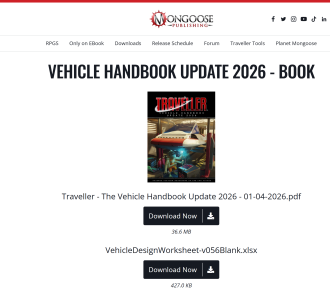
Vehicle Handbook Update 2026 - Now Here!

I have been trying to use the 2026 VHB to spec the IISS air/raft from JTAS 6. The VHB version comes in at nearly 2.5x the cost, around 2.5 MCr. Is this to be expected, or am I doing something wrong?
 
There is a field for discounts (W3). I would not expect the discount to be THAT big. Without specs I can't go deeper.
The core book air raft comes in on target though, and it was made under the previous system.
 
I have been trying to use the 2026 VHB to spec the IISS air/raft from JTAS 6. The VHB version comes in at nearly 2.5x the cost, around 2.5 MCr. Is this to be expected, or am I doing something wrong?
It’s a new system.

I think we have to draw the inevitable conclusion that the author in JTAS 6 couldn’t even be bothered to invent a Time Machine, travel years forward in time to spring 2026, grab a copy of the VHB published that glorious year, take it back with them and responsibly design an air/raft that complies with that future system, thus ensuring a basic level of compatibility. Sheer laziness. You should demand a refund.
 

LUXURY INTERIOR
Luxury interior space is anything but common areas. Any number of Spaces can become luxury space with increasing levels of high-end amenities, the variety of which are too vast to specify in all but general terms. At higher Tech Levels, more advanced systems, including holographic entertainment become available. Each level of luxury space provides an increasing multiplier to Comfort Points of the Space it occupies. A vehicle with a luxury exterior often has an interior with the best luxury available at its Tech Level, although perhaps only for the passenger compartment. If the entire interior space accessible by occupants (or at least passengers or residents, the crew might have common areas) then the vehicle’s rating for SOC increases by +1.

Luxury interior space does not consume extra Spaces but increases the luxury of common areas. An entertainment system of appropriate quality is included but an additional system would add more features and still add Comfort Points. Improved, Enhanced and Advanced luxury space requires a powered vehicle.


I’m not quite getting this - the first paragraph excludes common areas and the second includes it (!?)

I presume this can effectively be applied applied to existing spaces that crew and/or passengers occupy and would optionally extend to anything else that you cared to designate as luxury interior like bunks, freshers, galleys, and even cargo area - I’ve seen a Rolls Royce with a nicer boot/trunk than my Nissan’s cabin. Is it applied to Common areas?

 

LUXURY INTERIOR
Luxury interior space is anything but common areas. Any number of Spaces can become luxury space with increasing levels of high-end amenities, the variety of which are too vast to specify in all but general terms. At higher Tech Levels, more advanced systems, including holographic entertainment become available. Each level of luxury space provides an increasing multiplier to Comfort Points of the Space it occupies. A vehicle with a luxury exterior often has an interior with the best luxury available at its Tech Level, although perhaps only for the passenger compartment. If the entire interior space accessible by occupants (or at least passengers or residents, the crew might have common areas) then the vehicle’s rating for SOC increases by +1.

Luxury interior space does not consume extra Spaces but increases the luxury of common areas. An entertainment system of appropriate quality is included but an additional system would add more features and still add Comfort Points. Improved, Enhanced and Advanced luxury space requires a powered vehicle.


I’m not quite getting this - the first paragraph excludes common areas and the second includes it (!?)

I presume this can effectively be applied applied to existing spaces that crew and/or passengers occupy and would optionally extend to anything else that you cared to designate as luxury interior like bunks, freshers, galleys, and even cargo area - I’ve seen a Rolls Royce with a nicer boot/trunk than my Nissan’s cabin. Is it applied to Common areas?
I think the first paragraph should read "Luxury interior space is anything but common" , and scrub the mention of "areas." Then you can have the second line mentioned in a more complementary way, without contradiction.
 
Pretty sure Limpin Legion is correct. Try adding luxury space to common areas on @Geir 's spreadsheet to confirm the intent.
Or look at the VyrtyByrd, and count luxury spaces there. It has a luxury area split from a crew area.(Away from my book or I'd check it)
 
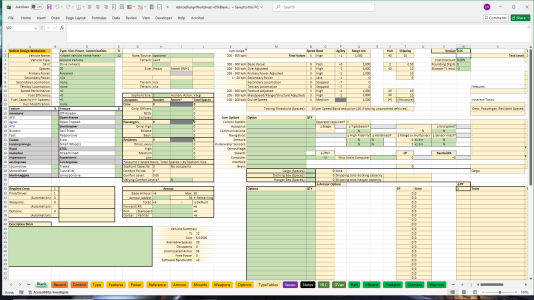
Where can you download the mythical vehicle spreadsheet? It's been a month since Matt said he was checking if he had the latest version and I'm not seeing any indicator it was made available and there is no spreadsheet download on DriveThruRPG if you bought the Vehicle Handbook.
 
Where can you download the mythical vehicle spreadsheet? It's been a month since Matt said he was checking if he had the latest version and I'm not seeing any indicator it was made available and there is no spreadsheet download on DriveThruRPG if you bought the Vehicle Handbook.
If you bought it here, it will be in the downloads area with the book. If you got it through DriveThrough RPG, I suspect it is in that download.

1775348334398.png
 
Where can you download the mythical vehicle spreadsheet? It's been a month since Matt said he was checking if he had the latest version and I'm not seeing any indicator it was made available and there is no spreadsheet download on DriveThruRPG if you bought the Vehicle Handbook.
1775350773791.png
It is the first entry for download in my DTRPG library under the VH'26
v056 is the most recent release
 
I really have problems using the Excel sheet:

- How, exactly, do I add a new line to the Control tab?

- Why are there no green-coloured fields for crew and passengers?

- How and for what do I spend the chosen number of Spaces?
 
I really have problems using the Excel sheet:

- How, exactly, do I add a new line to the Control tab?

- Why are there no green-coloured fields for crew and passengers?

- How and for what do I spend the chosen number of Spaces?
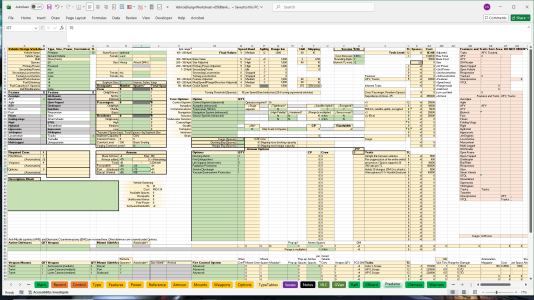
Control Tab: You have to add a new line above the "last" entry. Once it sees "last" it stops looking. The name has to match the tab name, do not put spaces in the Tab name.

Green fields for crew/passengers
1775597139993.png
Mine are all green.
Edit for clarification: Column H, starting at Row 11

Use Spaces:
Crew, armor, weapons, ammo all use spaces. The Options fields (m32) has drop downs for other options

Example:
1775597389204.png
 
Last edited:
I have a question concerning damaging vehicles. In our last session the PCs were tracked in the air by a Public Safety Cruiser (p167) after raiding an armoury. They used their newly acquired Raketinheitin (great name) Rocket Launcher loaded with an Anti-Air Missile to shoot it down.
Alas, even though they scored a critical hit due to effect +7, the couldn't penetrate the armor and therefore couldn't cause damage. We then realized, that with a damage of 8D6 it is nearly impossible to damage the Cruiser, even if you hit the Dorsal which "only" has Armour 33.
With an effect of +7 the damage is 8D6+7 and must penetrate the armour (TL doesn't apply because of the Crit), correct?
My players and I were a little baffled that a dedicated Anti-Air Missile is basically unable to cause even a scratch to the Cruiser. Is that correct or did I miss something?
 
I have a question concerning damaging vehicles. In our last session the PCs were tracked in the air by a Public Safety Cruiser (p167) after raiding an armoury. They used their newly acquired Raketinheitin (great name) Rocket Launcher loaded with an Anti-Air Missile to shoot it down.
Alas, even though they scored a critical hit due to effect +7, the couldn't penetrate the armor and therefore couldn't cause damage. We then realized, that with a damage of 8D6 it is nearly impossible to damage the Cruiser, even if you hit the Dorsal which "only" has Armour 33.
With an effect of +7 the damage is 8D6+7 and must penetrate the armour (TL doesn't apply because of the Crit), correct?
My players and I were a little baffled that a dedicated Anti-Air Missile is basically unable to cause even a scratch to the Cruiser. Is that correct or did I miss something?
I think you are better off using an anti-tank missile against any armoured vehicle - regardless of whether it is flying or not. At least the AT missile has an AP rating to subtract from the defender's armour. The AA missiles in MGT seem intended only for use against unarmoured flying vehicles.
 
8d6 does an average of 28 points, so it's certainly quite capable of getting through 33 points of protection. An effect of +7 would mean they rolled less than 27 on 8d6, which is about a 38% chance. If they'd rolled a little better, the target could very well have suffered a combat ending critical.

(Note that with an effect of +7, even one point of actual damage means a severity 2 critical. Depending on what their objective was, that could well mean it can't catch them, or it can't get away from them. An armour critical may mean that a follow up shot is MUCH more effective...)

Also... 33 points isn't trivial armour. Which makes sense for what I assume is a police vehicle? Proof against small arms and resistant to heavy weapons sounds spot on for purpose.

As well... 8d6 is a pretty light missile, and if it's not armour piercing it's likely meant to deal with relatively unarmoured targets.
 
Last edited:
Back
Top