Excel Ship Designer v2026.01.22

Looking at the issue some people are having with paragraph breaks.
When you import a carriage return from another document, there is no character to detect. If the field does not auto-expand, the characters left over in the current line count are still in the original field; display after inserting a line break in that field; and are hidden by the next row of text. Expanding that field would reveal the hidden text.
The narrative section of the summary is specifically told not to expand. The characters are counted and if they would go to a new line, either the line ends early or a - in inserted to break up the word. The intent being not to expand a line that would look stupid if you edit the same file and the area expanded now only needs a single line.

I suggest that we agree on a line break code that will tell the formulae to advance to the next line.
I suggest /p/
Each line will check for a /p/ and if found and the position is in its range, it will end that line and advance to the next.

Open to other suggestions.
Also, desired behavior? Go to the next line or skip a line before continuing.

Note that skipping lines could result in long narratives being truncated sooner than they otherwise might.
 
Looking at the issue some people are having with paragraph breaks.
When you import a carriage return from another document, there is no character to detect. If the field does not auto-expand, the characters left over in the current line count are still in the original field; display after inserting a line break in that field; and are hidden by the next row of text. Expanding that field would reveal the hidden text.
The narrative section of the summary is specifically told not to expand. The characters are counted and if they would go to a new line, either the line ends early or a - in inserted to break up the word. The intent being not to expand a line that would look stupid if you edit the same file and the area expanded now only needs a single line.

I suggest that we agree on a line break code that will tell the formulae to advance to the next line.
I suggest /p/
Each line will check for a /p/ and if found and the position is in its range, it will end that line and advance to the next.

Open to other suggestions.
Also, desired behavior? Go to the next line or skip a line before continuing.

Note that skipping lines could result in long narratives being truncated sooner than they otherwise might.
I like it and I would have to say skip a line.
 
Looking at the issue some people are having with paragraph breaks.
When you import a carriage return from another document, there is no character to detect. If the field does not auto-expand, the characters left over in the current line count are still in the original field; display after inserting a line break in that field; and are hidden by the next row of text. Expanding that field would reveal the hidden text.
The narrative section of the summary is specifically told not to expand. The characters are counted and if they would go to a new line, either the line ends early or a - in inserted to break up the word. The intent being not to expand a line that would look stupid if you edit the same file and the area expanded now only needs a single line.

I suggest that we agree on a line break code that will tell the formulae to advance to the next line.
I suggest /p/
Each line will check for a /p/ and if found and the position is in its range, it will end that line and advance to the next.

Open to other suggestions.
Also, desired behavior? Go to the next line or skip a line before continuing.

Note that skipping lines could result in long narratives being truncated sooner than they otherwise might.
The problem I'm encountering (and it should be the case in the example sheet I sent you) is that the linefeeds are real, there and working (they're not imported: they're from using alt-enter to insert a CRLF).

However, your target rows are fixed in height, so the first line is shown but everything after the CRLF is hidden.

So it is possible to make the text show correctly by expanding the height of the row above the one with missing text. Formatting is not perfect of course, because the target rows only take a fixed number of characters, as you say, so you end up with the correct amount of characters but split across fields.

So the fix for anyone experiencing this on existing sheets is to unprotect the sheet (the password is "Password") then expand the height of the cell before the missing text.

For fixing the problem in the sheet without the user having to manually expand cells I found that the following code worked: it shows all the text (although that can, as noted, lead to short lines). It feels a lot less hacky to me, though, than inserting manual mark-up characters.

Code:
Private Sub Worksheet_Calculate()
    On Error GoTo CleanExit

    Application.EnableEvents = False

    Dim rng As Range
    ' set this to the output area that contains the indexed text
    Set rng = Me.Range("B:B")   ' example: column B only (change as needed)

    Dim r As Range
    For Each r In rng.Rows
        If Not r.EntireRow.Hidden Then
            ' Skip rows that contain merged cells (AutoFit can fail on them)
            If Not r.MergeCells Then
                r.EntireRow.AutoFit
            End If
        End If
    Next r

CleanExit:
    Application.EnableEvents = True
End Sub

 
The problem I'm encountering (and it should be the case in the example sheet I sent you) is that the linefeeds are real, there and working (they're not imported: they're from using alt-enter to insert a CRLF).

However, your target rows are fixed in height, so the first line is shown but everything after the CRLF is hidden.

So it is possible to make the text show correctly by expanding the height of the row above the one with missing text. Formatting is not perfect of course, because the target rows only take a fixed number of characters, as you say, so you end up with the correct amount of characters but split across fields.

So the fix for anyone experiencing this on existing sheets is to unprotect the sheet (the password is "Password") then expand the height of the cell before the missing text.

For fixing the problem in the sheet without the user having to manually expand cells I found that the following code worked: it shows all the text (although that can, as noted, lead to short lines). It feels a lot less hacky to me, though, than inserting manual mark-up characters.

Code:
Private Sub Worksheet_Calculate()
    On Error GoTo CleanExit

    Application.EnableEvents = False

    Dim rng As Range
    ' set this to the output area that contains the indexed text
    Set rng = Me.Range("B:B")   ' example: column B only (change as needed)

    Dim r As Range
    For Each r In rng.Rows
        If Not r.EntireRow.Hidden Then
            ' Skip rows that contain merged cells (AutoFit can fail on them)
            If Not r.MergeCells Then
                r.EntireRow.AutoFit
            End If
        End If
    Next r

CleanExit:
    Application.EnableEvents = True
End Sub
I avoid codes, because users of old or non Windows products are shut out. If implemented, the markup would be available to libre users and your code insertion is an option for those comfortable with playing with the plumbing. Using the markup will only be apparent if you use it.
Note that you can get the same result as your code by unlocking the summary tab and manually expanding the line above the missing text.
As to hacky solutions, the entire summary tab feels like that to me. Especially when I have to insert something new.
 
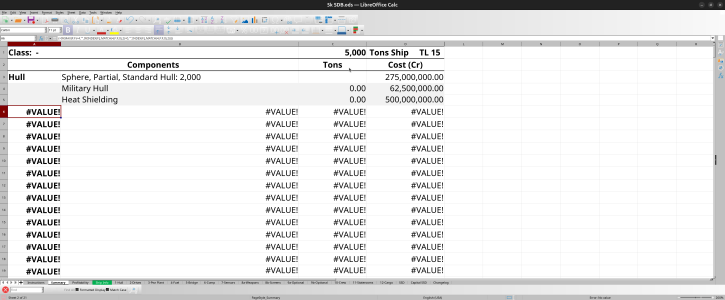
Speaking as a Libre user, I am not sure I understand how the 'Breakaway Hull' option works. I have a 5000 dTon hull, with the 'Breakaway' option; that means I should set aside 100 dTons for the Breakaway mechanism. That works. But then the 'unused space' on my ship changes, I get an extra 1080 dTons.


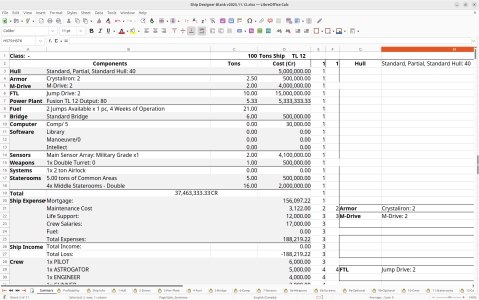
Also, I get this on my 'Summary' tab:

SDB from 2026-01-20 08-34-37.png
 
Last edited:
Speaking as a Libre user, I am not sure I understand how the 'Breakaway Hull' option works. I have a 5000 dTon hull, with the 'Breakaway' option; that means I should set aside 100 dTons for the Breakaway mechanism. That works. But then the 'unused space' on my ship changes, I get an extra 1080 dTons.


Also, I get this on my 'Summary' tab:

View attachment 7238

Can you attach or IM me the file? Has it ever worked for you or is this recent?
 
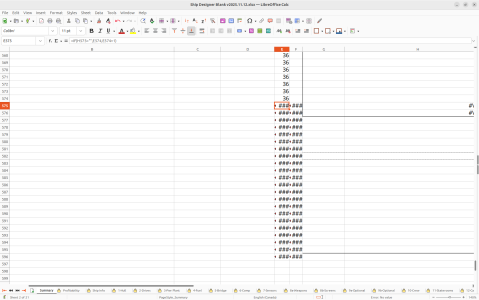
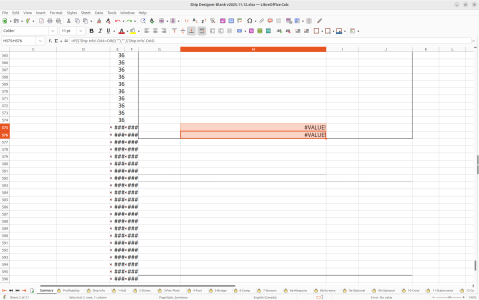
As a fellow Libre user, the broken summary tab as been a thing in every version after June 13 2025. The scripts are still the same, it just breaks around line 574 on columns E and F.Screenshot from 2026-01-20 11-05-11.png
 
As a fellow Libre user, the broken summary tab as been a thing in every version after June 13 2025. The scripts are still the same, it just breaks around line 574 on columns E and F.View attachment 7240
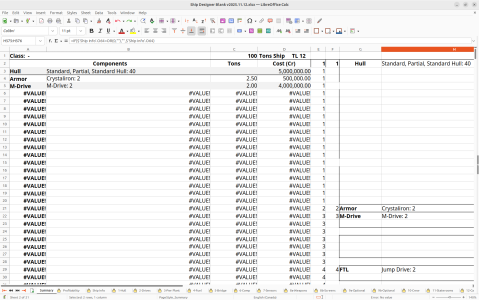
My summary tab looks very different -- only columns A through D have values, and only rows down to 339 have any contents. I am moving the Excel file to Google sheets, then exporting it as .ods -- are you getting yours imported through a different route?
 
I am adding a toggle to enable the user defined quirks. it will be NO by default. A No should make H575 & H576 read as ="" no matter what goes in the quirks so the summary should ignore them.
 
Back
Top