

Terry Mixon
Emperor Mongoose
For those that might like some additional columns and highlighting to make cargo options pop out a bit more, and to move the map front and center, here is my modified version of the sheet. Attached are screenshots of the new layout.
The modifications in a nutshell:
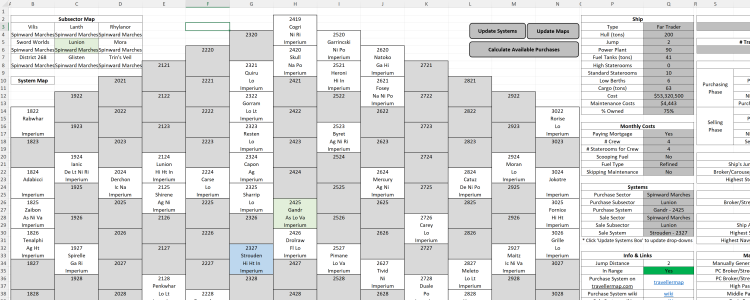
The most visible change is that I rearranged the Input tab to present the map first. There is a spot that displays the trade codes for the purchase and sale systems.
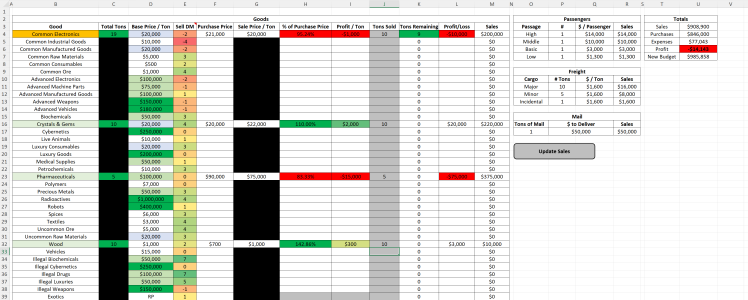
On the Sales tab, I added four columns. First, it shows the purchase price, so you don't have to guess or switch tabs. Second, it shows the percent of purchase price so you can see how the trade would go at a glance. Third, it shows the profit per ton so you can get an absolute idea of how you did without a calculator. Lastly, it shows the full profit/loss for the tonnage you have sold so you get the full impact at the purchase and sale prices.
I moved the order of entries for the freight, mail, and passengers in the sections for them to allow for better readability and order of operations. I also added an entry for the total tons of freight lots for convenience.
If you've held a cargo over because you couldn't get a good price, you can change the purchase price to what you paid in that column on the Sales tab and it will get cleared out when new cargo is generated.
The additional columns on the Sales tab meant that I needed to move some things around so that they were still visible to the right. They still work exactly as before. I added the table used to determine a price from a die roll for completeness.
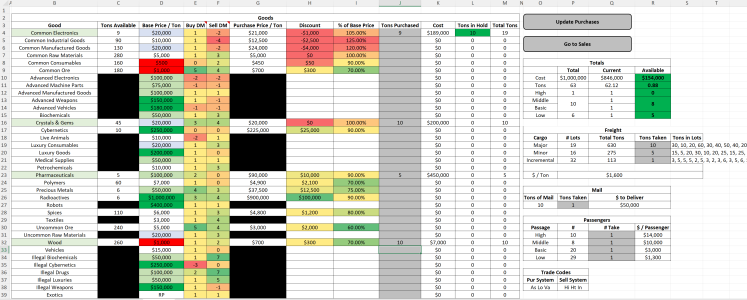
Additionally, I added two columns to the Purchases tab to show the percentage of discount from the base price and the actual amount that would be saved.
I have also added some highlighting on both the purchase and sale tabs to make it easier to see which are the most profitable (or unprofitable) at a glance.
I hope these changes enhance your experience with this tool. Enjoy!
The modifications in a nutshell:
The most visible change is that I rearranged the Input tab to present the map first. There is a spot that displays the trade codes for the purchase and sale systems.
On the Sales tab, I added four columns. First, it shows the purchase price, so you don't have to guess or switch tabs. Second, it shows the percent of purchase price so you can see how the trade would go at a glance. Third, it shows the profit per ton so you can get an absolute idea of how you did without a calculator. Lastly, it shows the full profit/loss for the tonnage you have sold so you get the full impact at the purchase and sale prices.
I moved the order of entries for the freight, mail, and passengers in the sections for them to allow for better readability and order of operations. I also added an entry for the total tons of freight lots for convenience.
If you've held a cargo over because you couldn't get a good price, you can change the purchase price to what you paid in that column on the Sales tab and it will get cleared out when new cargo is generated.
The additional columns on the Sales tab meant that I needed to move some things around so that they were still visible to the right. They still work exactly as before. I added the table used to determine a price from a die roll for completeness.
Additionally, I added two columns to the Purchases tab to show the percentage of discount from the base price and the actual amount that would be saved.
I have also added some highlighting on both the purchase and sale tabs to make it easier to see which are the most profitable (or unprofitable) at a glance.
I hope these changes enhance your experience with this tool. Enjoy!
Attachments
Last edited:


