So I’m a little confused about Orbit and Orbit# in the WBH. I think I understand the center orbit in the Habitable zone it’s square root of the Luminosity but than they reference the table on 26 and I’m getting confused can someone do a example walking through the math step by step for a F2 V single star with a Luminosity of 3.76041 I’m choosing Asim for my example because that’s the first system I’m working on but I have a bunch I’m going to do and I’m using data from the map and the wiki
 wiki.travellerrpg.com

You are using an out of date browser. It may not display this or other websites correctly.
You should upgrade or use an alternative browser.
You should upgrade or use an alternative browser.
Orbit# help
- Thread starter tytalan
- Start date
Bryn the 2300AD guy
Cosmic Mongoose
I don't have the WBH, but I have read it. Insolation (with Earth = 1) is:
Insolation = stellar luminosity/distance (in AU)^2
Hence if you set insolation = 1:
Distance^2 = Luminosity
Distance = Luminosity^0.5
So for Asim, if insolation is the same as Earth, orbital distance is 1.94 AU. This equates to orbit 4.3
"Earthlike" worlds should only exist in a small band, and I think the current consensus is +/- 5% of that optimal. However, GDW used Doles' 1964 book back in the 1980's, defining the habitable zone as 72%-145% of the optimal, although <86% would result in a planet only habitable at the poles and >120% only habitable at the equator.
However, the WBH gives the habitable zone as +/- 1 orbit. For Asim this would be 3.3 (1.2 AU) to 5.3 (3.6 AU). This is too broad. Liquid water cannot exist at either extreme of this zone. The extreme limits of the habitable zone are 1.4 to 2.8 AU, or approximately 1 orbit wide.
Insolation = stellar luminosity/distance (in AU)^2
Hence if you set insolation = 1:
Distance^2 = Luminosity
Distance = Luminosity^0.5
So for Asim, if insolation is the same as Earth, orbital distance is 1.94 AU. This equates to orbit 4.3
"Earthlike" worlds should only exist in a small band, and I think the current consensus is +/- 5% of that optimal. However, GDW used Doles' 1964 book back in the 1980's, defining the habitable zone as 72%-145% of the optimal, although <86% would result in a planet only habitable at the poles and >120% only habitable at the equator.
However, the WBH gives the habitable zone as +/- 1 orbit. For Asim this would be 3.3 (1.2 AU) to 5.3 (3.6 AU). This is too broad. Liquid water cannot exist at either extreme of this zone. The extreme limits of the habitable zone are 1.4 to 2.8 AU, or approximately 1 orbit wide.
I’m not sure your understanding my question and not using the WBH really doesn’t help at all Insolation is not mentioned at all in the book and I understand the habitable zone it’s the Orbits#’s that are the issue and how to determine their positions. I’m also asking for an example say minimum 4 or 5 Orbits#. Unfortunately the example in the book is a dual star system and that’s throwing me off.I don't have the WBH, but I have read it. Insolation (with Earth = 1) is:
Insolation = stellar luminosity/distance (in AU)^2
Hence if you set insolation = 1:
Distance^2 = Luminosity
Distance = Luminosity^0.5
So for Asim, if insolation is the same as Earth, orbital distance is 1.94 AU. This equates to orbit 4.3
"Earthlike" worlds should only exist in a small band, and I think the current consensus is +/- 5% of that optimal. However, GDW used Doles' 1964 book back in the 1980's, defining the habitable zone as 72%-145% of the optimal, although <86% would result in a planet only habitable at the poles and >120% only habitable at the equator.
However, the WBH gives the habitable zone as +/- 1 orbit. For Asim this would be 3.3 (1.2 AU) to 5.3 (3.6 AU). This is too broad. Liquid water cannot exist at either extreme of this zone. The extreme limits of the habitable zone are 1.4 to 2.8 AU, or approximately 1 orbit wide.
Thank you for trying but this is definitely a WBH question and I’m not sure you can help without referencing it.
But thank you again

Terry Mixon
Emperor Mongoose
You could tag him like this. Oh @Geir!Can someone point Geir to this post please?
I'm not Geir, but taking a look at the WBH and the Traveller wiki:
Traveller wiki gives the luminosity of Asim's star as 3.76041. I don't know who came up with that value, but it seems plausible for an F2 V. Let's use that.
(I get 3.63 by the formula, which is close enough. The diameter in the wiki looks wrong to me -- in fact, it's double the expected diameter, unless I'm missing something.* But let's ignore that, as we don't need it for the following.)
*(EDIT: I was missing something -- I'd divided by solar radius instead of solar diameter to get a diameter value, oops! So it looks like the wiki diameter is fine.)
So, using the formula on WBH page 41, we calculate:
Distance
= sqrt(Luminosty)
= sqrt(3.76041)
= 1.939178 AU
This is the Habitable Zone Centre in AU, or HZC(AU). Let's round it to 1.939.
(Checking the Habitable Zone Centre table, we can see that an F2 V should have a HZC(AU) between 2.85 and 1.87, so we're within the plausible range, just.)
We go back to pages 26 and 27 to convert this into a Traveller Orbit Number (Orbit#).
In the table on page 26, we look for the values in the Distance column that bracket our HZC(AU) value.
Our value of 1.939 is between 1.6 and 2.8, so we're looking at an Orbit# of 4 point <something>.
So, for the formula on page 27:
our AU value is the HZC(AU) we've already calculated, i.e. 1.939
our 'Full Orbit#' is 4
our 'Distance(AU) of Full Orbit#' is 1.6
our 'Difference(AU) of Full Orbit#' is 1.2 (from the table).
We plug these into the formula on page 27 to find our Habitable Zone Centre Orbit#, or HZCO:
HZCO
= 4 + ((1.939 - 1.6) / 1.2)
= 4.2825
We can round this to 4.28.
Going back to page 42, we check against the second table to see that the HZCO for an F2 V should normally be between 5.0 and 4.2, so that's fine (just).
From page 43, the breadth of the habitable zone is two Orbit#s, so for this system, the habitable zone could run from Orbit# 3.3 to Orbit# 5.3. (As Bryn said upthread, this is probably too broad, but let's stick with the book.) So Asim's actual Orbit# is somewhere in that range.
Travellerworlds puts Asim at Orbit# 3.8, for what it's worth, or you can use the WBH method starting on page 43 to place worlds in the system.
Apologies if I've got something wrong, which is quite likely!
Traveller wiki gives the luminosity of Asim's star as 3.76041. I don't know who came up with that value, but it seems plausible for an F2 V. Let's use that.
(I get 3.63 by the formula, which is close enough. The diameter in the wiki looks wrong to me -- in fact, it's double the expected diameter, unless I'm missing something.* But let's ignore that, as we don't need it for the following.)
*(EDIT: I was missing something -- I'd divided by solar radius instead of solar diameter to get a diameter value, oops! So it looks like the wiki diameter is fine.)
So, using the formula on WBH page 41, we calculate:
Distance
= sqrt(Luminosty)
= sqrt(3.76041)
= 1.939178 AU
This is the Habitable Zone Centre in AU, or HZC(AU). Let's round it to 1.939.
(Checking the Habitable Zone Centre table, we can see that an F2 V should have a HZC(AU) between 2.85 and 1.87, so we're within the plausible range, just.)
We go back to pages 26 and 27 to convert this into a Traveller Orbit Number (Orbit#).
In the table on page 26, we look for the values in the Distance column that bracket our HZC(AU) value.
Our value of 1.939 is between 1.6 and 2.8, so we're looking at an Orbit# of 4 point <something>.
So, for the formula on page 27:
our AU value is the HZC(AU) we've already calculated, i.e. 1.939
our 'Full Orbit#' is 4
our 'Distance(AU) of Full Orbit#' is 1.6
our 'Difference(AU) of Full Orbit#' is 1.2 (from the table).
We plug these into the formula on page 27 to find our Habitable Zone Centre Orbit#, or HZCO:
HZCO
= 4 + ((1.939 - 1.6) / 1.2)
= 4.2825
We can round this to 4.28.
Going back to page 42, we check against the second table to see that the HZCO for an F2 V should normally be between 5.0 and 4.2, so that's fine (just).
From page 43, the breadth of the habitable zone is two Orbit#s, so for this system, the habitable zone could run from Orbit# 3.3 to Orbit# 5.3. (As Bryn said upthread, this is probably too broad, but let's stick with the book.) So Asim's actual Orbit# is somewhere in that range.
Travellerworlds puts Asim at Orbit# 3.8, for what it's worth, or you can use the WBH method starting on page 43 to place worlds in the system.
Apologies if I've got something wrong, which is quite likely!
Last edited:
Bryn the 2300AD guy
Cosmic Mongoose
I think the issue is the HZCO, the root of the luminosity, is calculated in AU, not orbit no.
You calculate the orbital distance in AU and then convert to orbit no.
You calculate the orbital distance in AU and then convert to orbit no.
I actually understood the Habitable zone my confusion is how you figure the orbits in general. Do I just use the table on pg 26 making orbit#1 always .4 AU? Or is there a variation or a step I’m missing? And how does that affect Orbit #2? What’s the difference between Distance (AU) and Difference (AU). By the way you example does help so thank you.I'm not Geir, but taking a look at the WBH and the Traveller wiki:
Traveller wiki gives the luminosity of Asim's star as 3.76041. I don't know who came up with that value, but it seems plausible for an F2 V. Let's use that.
(I get 3.63 by the formula, which is close enough. The diameter in the wiki looks wrong to me -- in fact, it's double the expected diameter, unless I'm missing something. But let's ignore that, as we don't need it for the following.)
So, using the formula on WBH page 41, we calculate:
Distance
= sqrt(Luminosty)
= sqrt(3.76041)
= 1.939178 AU
This is the Habitable Zone Centre in AU, or HZC(AU). Let's round it to 1.939.
(Checking the Habitable Zone Centre table, we can see that an F2 V should have a HZC(AU) between 2.85 and 1.87, so we're within the plausible range, just.)
We go back to pages 26 and 27 to convert this into a Traveller Orbit Number (Orbit#).
In the table on page 26, we look for the values in the Distance column that bracket our HZC(AU) value.
Our value of 1.939 is between 1.6 and 2.8, so we're looking at an Orbit# of 4 point <something>.
So, for the formula on page 27:
our AU value is the HZC(AU) we've already calculated, i.e. 1.939
our 'Full Orbit#' is 4
our 'Distance(AU) of Full Orbit#' is 1.6
our 'Difference(AU) of Full Orbit#' is 1.2 (from the table).
We plug these into the formula on page 27 to find our Habitable Zone Centre Orbit#, or HZCO:
HZCO
= 4 + ((1.939 - 1.6) / 1.2)
= 4.2825
We can round this to 4.28.
Going back to page 42, we check against the second table to see that the HZCO for an F2 V should normally be between 5.0 and 4.2, so that's fine (just).
From page 43, the breadth of the habitable zone is two Orbit#s, so for this system, the habitable zone could run from Orbit# 3.3 to Orbit# 5.3. (As Bryn said upthread, this is probably too broad, but let's stick with the book.) So Asim's actual Orbit# is somewhere in that range.
Travellerworlds puts Asim at Orbit# 3.8, for what it's worth, or you can use the WBH method starting on page 43 to place worlds in the system.
Apologies if I've got something wrong, which is quite likely!
As for the size and Luminosity of Asim I believe all the numbers like that in the Wiki use the Mass and Temperature +-20% variance but I’m not sure.
First orbit# is at the MAO, second is MAO + Spread, third is MAO + 2 x spread, etc.
Keep in mind there can be empty orbits, and also Orbit#s less than 1.0 get divided by 10, so if your'e at 0.3 + spread of 2.1, you'd actually only add 0.3 + 0.21 to get 0.51.
I believe there was an option to add some variance to the spread each time so the orbits are not so formulaic, but I don't recall which page it was on.
In case you don't want to do all those calculations by hand, I wrote a free tool: https://github.com/coolAlias/star_gen
Keep in mind there can be empty orbits, and also Orbit#s less than 1.0 get divided by 10, so if your'e at 0.3 + spread of 2.1, you'd actually only add 0.3 + 0.21 to get 0.51.
I believe there was an option to add some variance to the spread each time so the orbits are not so formulaic, but I don't recall which page it was on.
In case you don't want to do all those calculations by hand, I wrote a free tool: https://github.com/coolAlias/star_gen
I'm happy the example helped a bit!I actually understood the Habitable zone my confusion is how you figure the orbits in general. Do I just use the table on pg 26 making orbit#1 always .4 AU? Or is there a variation or a step I’m missing? And how does that affect Orbit #2? What’s the difference between Distance (AU) and Difference (AU). By the way you example does help so thank you.
Okay, so is placing planets is the bit you're unsure about? If so, you don't use the table on page 26 directly.
Distance (AU) on the page 26 table is the distance from the centre of the star. So Orbit#1 is always 0.4 AU from the centre of the star, Orbit# 2 is always 0.7 AU and so on. This doesn't mean the first planet is always in Orbit #1 -- there doesn't have to be anything significant in Orbit# 1, and in some cases it will be inside the star. (You may already know this, but I'm working through it just in case.)
Difference (AU) on the page 26 table is the difference between that Orbit# and the next one down. You only need this value if you're converting between fractional Orbit#s and AU values, which you can do using the formulas on pages 26 and 27.
For example, Orbit# 1.5 is halfway between Orbit# 1 and Orbit# 2. The orbital distances in AU for those two Orbit#s in AU are 0.4 and 0.7, so the distance of Orbit# 1.5 in AU is equal to 0.4 + 0.5 * (0.7 - 0.4) = 0.55 AU. The Difference (AU) from the table just saves us the step of doing 0.7 - 0.4 in this calculation.
I hope this isn't more confusing, but it may help to bear in mind that Orbit#s are basically an arbitrary system based on the position of objects in our own solar system. Mercury is at Orbit# 1, Venus is at Orbit# 2 and so on. In a sense, Traveller takes a simplified 'map' of the orbits of our system, puts that over any other system, and looks at how the orbits in the other system line up with the orbits in our system. For example, if a scout jumps into an unknown system and spots a planet at 1.6 AU out from the star, he can say, "Oh, that's at Orbit# 4."
You can place the planets in the system kind of as you like. For example, Asim's system has 10 planets (according to Travellermap): Asim itself, 4 other terrestrial planets and 5 gas giants. You could just plonk the 5 terrestrial planets down in, say, Orbit#s 1.3, 2.3, 3.3, 4.3 and 5.3 (with Asim in the 4.3 slot), then space the gas giants out similarly from 6.3 to 10.3. (They don't have to be exactly 1 value apart from each other -- I just chose those values for convenience.)
Or you could use the method in WBH starting from page 43. As CoolAlias says, this uses Spread (from page 48) and Minimum Allowable Orbit# (MAO, from page 39), putting the first planet at MAO + Spread (+ optional variance), and working outward from there.
Ooh, this looks really neat!In case you don't want to do all those calculations by hand, I wrote a free tool: https://github.com/coolAlias/star_gen
Maxijohndoe
Cosmic Mongoose
I created the Asim System using the UWP data and the information from the Wiki using Universe Sandbox.
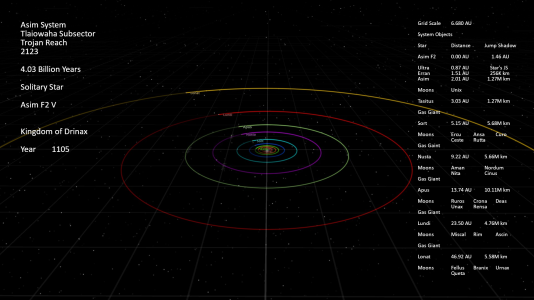
With an F2 1.46 Solar Mass star at 2.01 AU Asim has an average temperature of 24.4 degrees with a range from -97.8 to 33.3 degrees.
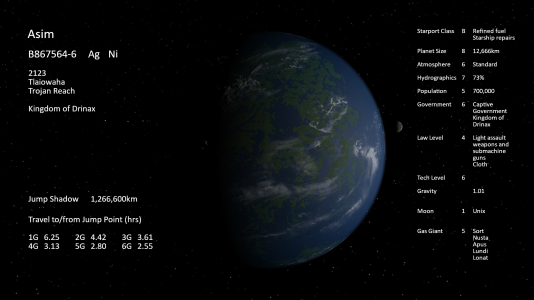
With an F2 1.46 Solar Mass star at 2.01 AU Asim has an average temperature of 24.4 degrees with a range from -97.8 to 33.3 degrees.
Last edited:
Maxijohndoe
Cosmic Mongoose
I have created these for every system used in the Pirates of Drinax campaign.
Reddit post re Drop Box
Yah I can finally post links!
The above is a bit out of date as I have done Dpres and most of Jewell as well. Once things get back to normal I'll finish the Spinward March systems as I have old versions and need to update them.
Reddit post re Drop Box
Yah I can finally post links!
The above is a bit out of date as I have done Dpres and most of Jewell as well. Once things get back to normal I'll finish the Spinward March systems as I have old versions and need to update them.
So if I’m understanding right I can do one of two thingsOr you could use the method in WBH starting from page 43. As CoolAlias says, this uses Spread (from page 48) and Minimum Allowable Orbit# (MAO, from page 39), putting the first planet at MAO + Spread (+ optional variance), and working outward from there.
1) use the orbit values on page 26 with slight adjustments or
2) determine the MAO# by multiplying the the star diameter by .01AU (this gives me the first orbit location). Than I use the Baseline Number to determine which formula I use to compute the placement of the baseline world (if the number baseline number is greater or equal to one the the baseline Orbit will be in the Habitable Zone) once I have the Baseline Orbit figured I use the spread and the orbit slot to determine the location of the Orbit starting with the MAO.
Okay I think I’ve got it the two different methods (which are kind of mixed together) was confusing me. It shouldn’t take much to create a excel sheet to figure orbit # out.
I appreciate the offers of the versions of the systems that have been done and I may still adapt one of them. That said I kinda have a picture of what I want Asim to be.
I see it as a moon of a superjovian gas giant just inside of the Habitable Zone, I’m wanting it to be just a little cooler than earth with a equatorial temperature running about Northern Texas range the population will primarily be on the southern continents and those continents will be connected by a large railcosway that circles the planets (it’s also has a pipeline to distribute liquid Hydrogen which before the Aslan bombing was used as the primary fuel for the planet. My concept is that durning the Sindalian Empire the noble that ruled Asim was a fanboy of old earth cowboy movies so he had his geneticist adapt wheat and only Terran crops to the world and with genetic material creat herds of both cows, buffalo, and horses. At its high point during the empires Asim beef was famed throughout the Reach in fact the Aslan especially loved that why the commander of the force sent to Asim blow up the space station that supplied the world raw Hydrogen and hit the spaceport (which had the primary refinery) but did little to the Starport. This allowed the Foundation to encourage the people to leave the farms and ranches (no fuel to support them) and center around the main city. The ideal is that Asim could be a economic boon to Drinax with the right management (in my version lady Telwax just took over 5 years ago and the Foundation is fighting her not sure yet if it will be open or passive).
I alway thought that Asim was kinda ignored by PoD yea it the location for one of the Adventures it always seemed a after thought so I wanted to give it potential and character
I see it as a moon of a superjovian gas giant just inside of the Habitable Zone, I’m wanting it to be just a little cooler than earth with a equatorial temperature running about Northern Texas range the population will primarily be on the southern continents and those continents will be connected by a large railcosway that circles the planets (it’s also has a pipeline to distribute liquid Hydrogen which before the Aslan bombing was used as the primary fuel for the planet. My concept is that durning the Sindalian Empire the noble that ruled Asim was a fanboy of old earth cowboy movies so he had his geneticist adapt wheat and only Terran crops to the world and with genetic material creat herds of both cows, buffalo, and horses. At its high point during the empires Asim beef was famed throughout the Reach in fact the Aslan especially loved that why the commander of the force sent to Asim blow up the space station that supplied the world raw Hydrogen and hit the spaceport (which had the primary refinery) but did little to the Starport. This allowed the Foundation to encourage the people to leave the farms and ranches (no fuel to support them) and center around the main city. The ideal is that Asim could be a economic boon to Drinax with the right management (in my version lady Telwax just took over 5 years ago and the Foundation is fighting her not sure yet if it will be open or passive).
I alway thought that Asim was kinda ignored by PoD yea it the location for one of the Adventures it always seemed a after thought so I wanted to give it potential and character
I think that's right!So if I’m understanding right I can do one of two things
1) use the orbit values on page 26 with slight adjustments or
2) determine the MAO# by multiplying the the star diameter by .01AU (this gives me the first orbit location). Than I use the Baseline Number to determine which formula I use to compute the placement of the baseline world (if the number baseline number is greater or equal to one the the baseline Orbit will be in the Habitable Zone) once I have the Baseline Orbit figured I use the spread and the orbit slot to determine the location of the Orbit starting with the MAO.
Okay I think I’ve got it the two different methods (which are kind of mixed together) was confusing me. It shouldn’t take much to create a excel sheet to figure orbit # out.
One cautionary note -- you may already get this, but just in case -- when determining the MAO#, multiplying by 0.01 AU works if you're starting with the star diameter in Solar units. This is what the table on page 19 gives you, and for Asim's primary will come to about 1.62. If instead you're starting with the star diameter in AU or km, you'll need to convert to Sol diameters first. (Alternatively, you can just use the table on page 39.)
Just for reference, taking Asim's primary as 1.62 Solar diameters, I get a minimum orbit distance of 0.0162 AU, which I calculate as Orbit# 0.0405.
This is a bit outside what we'd get from the table on page 39, but I think it's within variance (about +12%).
(Incidentally, I now think the Traveller wiki diameter for Asim's primary is fine. I'd made an error in my own calculation of the diameter.)
I've downloaded a whole bunch of your work -- thanks for sharing it! Just out of interest, how long does it take you to generate a system in Universe Sandbox?I have created these for every system used in the Pirates of Drinax campaign.
Reddit post re Drop Box
Yah I can finally post links!
The above is a bit out of date as I have done Dpres and most of Jewell as well. Once things get back to normal I'll finish the Spinward March systems as I have old versions and need to update them.
That software looks amazing. I was trying to see if there was a "free" try before you buy option but couldn't see it.I created the Asim System using the UWP data and the information from the Wiki using Universe Sandbox.
Is it as good as it looks ?


