Auto-Jimmy v0.9.4: X-Boat Routing Release

CthulhuStig

Banded Mongoose
I thought it was about time I got my ass in gear and pulled together another release of Auto-Jimmy. Not many new features this time around, most of my time since the last release has been spent reworking existing code to allow for some of the future features I have planned.

Release Highlights:
  • X-Boat Routing
    • The jump route planner can now plot paths that follow X-Boat routes between systems
    • X-Boat (Strict) will find the shortest-time route while following the official point-to-point X-Boat routes between systems
    • X-Boat (Loose) will find the shortest-time route but can skip nodes in the X-Boat network if the ship jump rating allows
    • Both algorithms will revert to routing through non-X-Boat systems if no X-Boat path is possible
    • Can be selected from Route Optimisation drop down
  • Jump Route Import/Export
    • Jump routes and associated logistics data can now be exported & imported
    • Accessed from context menu displayed when right-clicking on the map
  • Table Export
    • Tables can now be exported to CSV, HTML or bitmap
    • Accessed from context menu displayed when right-clicking on a table
As an example of strict vs loose X-Boat routing. If you were plotting a J-4 route from Lysen (Jewell) to Regina (Regina), strict routing would generate the route Lysen -> Efate -> Boughene -> Feri -> Roup -> Regina. Whereas loose routing would generate the route Lysen -> Efate -> Roup -> Regina, skipping Boughene and Feri. Although there is no official X-Boat link between Efate and Roup, they are both nodes on the X-Boat network and are within J-4 of each other.

If you're planning to use the Windows installer, I should warn you that it’s not digitally signed (as that costs money). This means your browser may warn you that it’s not a frequently downloaded program and/or make you confirm that you want to download it. Also, when you run the installer, Windows will almost certainly warn you that it’s an unknown app and make you jump through some hoops to install it.

If you've previously cloned the Auto-Jimmy repo or downloaded the source from GitHub, you may need to re-run the command to have pip install requirements.txt. Details on how to do this can be found in the installation instructions in the Auto-Jimmy README.

Project Links:
Source Code and Docs: https://github.com/cthulhustig/autojimmy
Windows Installer: https://github.com/cthulhustig/autojimmy/releases
Screenshots: https://github.com/cthulhustig/autojimmy/blob/main/docs/screenshots.md
Known Issues: https://github.com/cthulhustig/autojimmy/blob/main/docs/known_issues.md
 
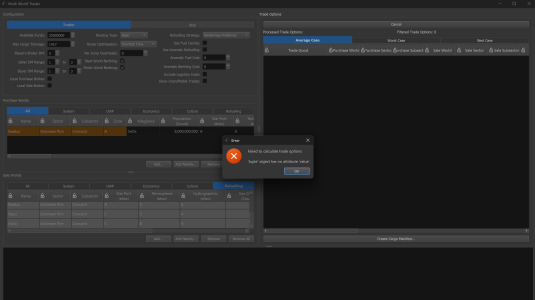
I'm not sure what tupple is, but it has no value and I have no idea of how to give it one.
Thanks for letting me know. I've pushed a fix for the bug, it's amazing the problems a single comma can cause 🤦‍♂️.

If you installed Auto-Jimmy by cloning the repo, you should be able to pull down the fix. If you installed it by downloading a zip of the source code, you can grab a new one from the same place. Unfortunately, if you use the Windows installer, you'll need to wait until I get around to creating a new one but you should be able to work around the issue by changing the Routing Type to Fuel Based.
 
Thanks for letting me know. I've pushed a fix for the bug, it's amazing the problems a single comma can cause 🤦‍♂️.

If you installed Auto-Jimmy by cloning the repo, you should be able to pull down the fix. If you installed it by downloading a zip of the source code, you can grab a new one from the same place. Unfortunately, if you use the Windows installer, you'll need to wait until I get around to creating a new one but you should be able to work around the issue by changing the Routing Type to Fuel Based.
Option 3 for me, then. Thanks.
 
@CthulhuStig, I was using the jump route planner feature to plan a route for a J6 liner running from Terra to Capital and it was an unexpected pain since a liner needs to meet certain criteria for the worlds along its route.

That led me to making this feature request. There needs to be criteria for excluding worlds. A planner should be able to set minimum levels for population, Starport class, law level threshold (high and low both), exclude red zones (or even amber if the like), exclude select government types, and mandate gas giant refueling, thought that might already be covered.

If you add those features, I’m sure that there are things that others might need. It would certainly speed up the process and fine tune the potential stops better than continually recalculating the route after excluding one world and hoping the replacement is better.

Thanks.
 
Last edited:
@CthulhuStig, I was using the jump route planner feature to plan a route for a J6 liner running from Terra to Capital and it was an unexpected pain since a liner needs to meet certain criteria for the worlds along its route.
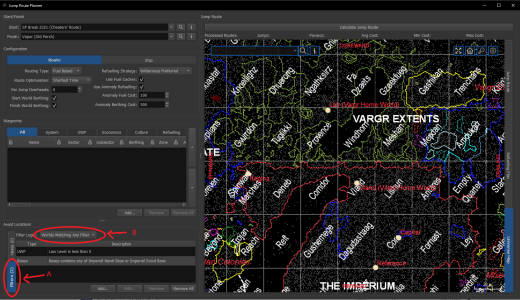
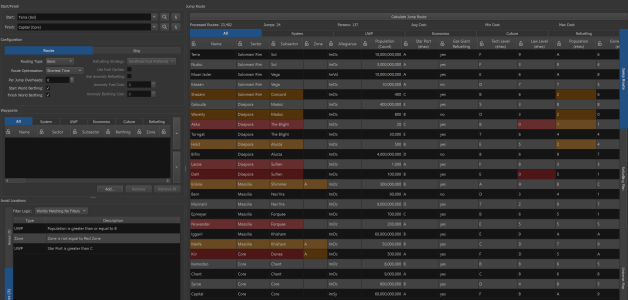
If I'm understanding what your asking, then you're in luck, it can already do that. In the Avoid Locations section of the route planner, you can switch to the Filters tab (A in the screenshot below). It allows you to create multiple filters, each one specifying different criteria (worlds law level greater/less than a value, worlds with imperial bases etc). The Filter Logic drop down (B in the screenshot) can be used to choose if the route planner avoids worlds that match any, all or none of the specified filters.

1773706166019.png
 
If I'm understanding what your asking, then you're in luck, it can already do that. In the Avoid Locations section of the route planner, you can switch to the Filters tab (A in the screenshot below). It allows you to create multiple filters, each one specifying different criteria (worlds law level greater/less than a value, worlds with imperial bases etc). The Filter Logic drop down (B in the screenshot) can be used to choose if the route planner avoids worlds that match any, all or none of the specified filters.

View attachment 7717
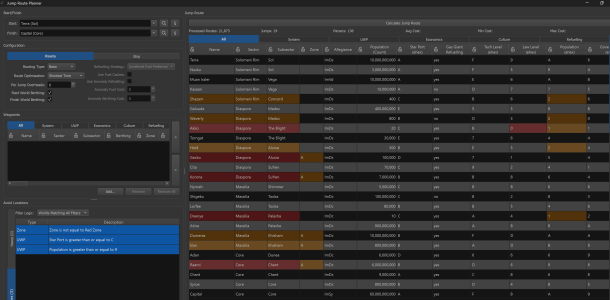
I did not see that, but while it would suit, it doesn't seem to be working. Note the filters and the results.

1773715553165.png

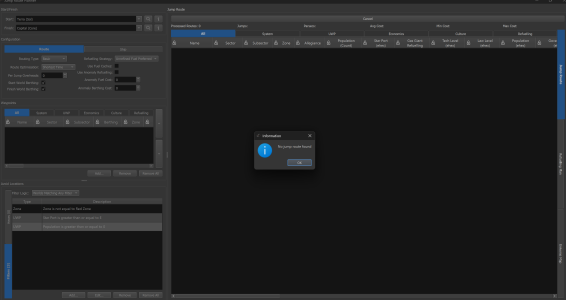
Feeling like I misused that filter and it should be any rather than all, I reran it with any and it failed to find a route with even the most inoffensive restrictions.

1773716412464.png

Even reducing it to only a population greater than 0 as the only rule failed to find a valid route. Seems broke.

1773716612286.png

I tried matching no filters, just to be thurough. Doesn't seem to care.

1773717419838.png

It's still possible I'm doing this wrong, so any insight would be appreciated.
 
Last edited:
I finally figured out I was telling it what I wanted rather than what to avoid. Sigh.

That said, even when I selected less than D for starports (talk about counter intuitive) it still showed some D ports, so there is something wrong there.
 
Last edited:
One other thing I've noted is that it's hard to exclude non-Imperial worlds. One would have to do each and every allegiance except Imperial. Perhaps adding something to do that for the major polities so my route from Capital to Glisten doesn't go way off into Vargr turf?
 
When I try to plot a J6 route across the rift from Riftspan Station to Glisten without any exclusions at all, it tells me no route found. An eyeball tells me that there is indeed a route, so something is going on there. I suspect it does not see Riftspan Station or Chandler Station as viable destinations, though I could be wrong. TravellerMap shows them as anomalies, so I even checked that box to no avail. As those two stations (and likely others elsewhere) are there specifically for crossing the rift, that does create a problem.
 
Last edited:
I finally figured out I was telling it what I wanted rather than what to avoid. Sigh.
Yes, you described it really well in your original question, you're specifying "criteria for excluding worlds". I might borrow that wording if I ever need to explain this stuff in the future. The filter logic is then used to specify how many of those criteria a world must match for it to be excluded.

That said, even when I selected less than D for starports (talk about counter intuitive) it still showed some D ports, so there is something wrong there.
Is the counter intuitive part your talking about the fact that the filters consider a C class starport to be "less than" a D class starport? That is down to the fact the ehex based filters works by comparing the numerical equivalent of the ehex codes, so C is 12 and D is 13, which means C is considered less than D. This logic makes sense for the majority of UWP/economics/culture/PBG codes that you might want to do a relative comparison on, as generally ehex values increase as levels/sizes/populations etc increase. However, the one annoying exception is starport where values decrease as the starport gets better. I could make starport a special case and have D considered to be "less than" C, but that isn't ideal as it then works differently to how all the other ehex based filters work. I'll need to have a think about what the best way to handle this is.

Counter intuitivity aside, I think the fact you're still seeing D class starports being allowed in the case you describe is expected. If you've specified that you want to avoid starports that are considered less than D, then it will still allow D starports (no mater which way the comparison logic worked). I'm not sure what you're trying to achieve with the filter, if you're wanting to avoid A-D starports you should set the operation to 'less than or equal to', if you're trying to avoid D-X starports you should set it to 'greater than or equal to'.

One other thing I've noted is that it's hard to exclude non-Imperial worlds. One would have to do each and every allegiance except Imperial. Perhaps adding something to do that for the major polities so my route from Capital to Glisten doesn't go way off into Vargr turf?
If you know the right regex magic spell to cast then you can get something that will work in the majority of cases, but it's a totally fair point that it's pretty hard to do if you don't know regex. When creating the allegiance filter, configure it with the settings below. This will create a filter that will exclude worlds that don't have an allegiance code that starts with 'Im' or an allegiance name that starts with 'Third Imperium'.

Operation: Matches Regex
Value: ^(?!Third Imperium.*$|Im\w\w$).*

However, it sounds like what you're really looking for in this case is a way to allow worlds rather than exclude them (i.e. only allow worlds with allegiance X). I've not thought it through fully, but I could probably add something that would allow you to do that. I'll add it to the list of things for me to look at but not sure when I'll get to it.

I'm not sure about having something that lets you select the major polities though. My aim is for Auto-Jimmy to use the Traveller rules, but it's not tied to the universe. It means I'm trying to avoid adding stuff that is directly tied to things from that universe, such as what the major polities are.

When I try to plot a J6 route across the rift from Riftspan Station to Glisten without any exclusions at all
Could you send me a couple of screenshots showing how you have the route planner window configured when you're seeing this problem, one with the Routing tab showing and the other with the Ship tab showing? When I try it, it finds a route, but I'm not sure how you've got all the settings configured.
 
Yes, you described it really well in your original question, you're specifying "criteria for excluding worlds". I might borrow that wording if I ever need to explain this stuff in the future. The filter logic is then used to specify how many of those criteria a world must match for it to be excluded.

Tricksy it is, My Precious.

Is the counter intuitive part your talking about the fact that the filters consider a C class starport to be "less than" a D class starport? That is down to the fact the ehex based filters works by comparing the numerical equivalent of the ehex codes, so C is 12 and D is 13, which means C is considered less than D. This logic makes sense for the majority of UWP/economics/culture/PBG codes that you might want to do a relative comparison on, as generally ehex values increase as levels/sizes/populations etc increase. However, the one annoying exception is starport where values decrease as the starport gets better. I could make starport a special case and have D considered to be "less than" C, but that isn't ideal as it then works differently to how all the other ehex based filters work. I'll need to have a think about what the best way to handle this is.

Yep. Or add a note to the selection box making it clear for dunces like me. ;)

Counter intuitivity aside, I think the fact you're still seeing D class starports being allowed in the case you describe is expected. If you've specified that you want to avoid starports that are considered less than D, then it will still allow D starports (no mater which way the comparison logic worked). I'm not sure what you're trying to achieve with the filter, if you're wanting to avoid A-D starports you should set the operation to 'less than or equal to', if you're trying to avoid D-X starports you should set it to 'greater than or equal to'.

You're probably right.

If you know the right regex magic spell to cast then you can get something that will work in the majority of cases, but it's a totally fair point that it's pretty hard to do if you don't know regex. When creating the allegiance filter, configure it with the settings below. This will create a filter that will exclude worlds that don't have an allegiance code that starts with 'Im' or an allegiance name that starts with 'Third Imperium'.

Operation: Matches Regex
Value: ^(?!Third Imperium.*$|Im\w\w$).*

However, it sounds like what you're really looking for in this case is a way to allow worlds rather than exclude them (i.e. only allow worlds with allegiance X). I've not thought it through fully, but I could probably add something that would allow you to do that. I'll add it to the list of things for me to look at but not sure when I'll get to it.

I'm not sure about having something that lets you select the major polities though. My aim is for Auto-Jimmy to use the Traveller rules, but it's not tied to the universe. It means I'm trying to avoid adding stuff that is directly tied to things from that universe, such as what the major polities are.

Thanks. I've used it before in a past life as a Linux system admin, but that was more than 25 years ago.

An addition like that would help folks that don't know regex, though. Like me these days.

Could you send me a couple of screenshots showing how you have the route planner window configured when you're seeing this problem, one with the Routing tab showing and the other with the Ship tab showing? When I try it, it finds a route, but I'm not sure how you've got all the settings configured.

Weirdly, now it works. I must've been doing something wrong that I'm not doing now. Sorry about that.
 
Back
Top