Another System Generator: As Above So Below

I bet there are 40-50 other players have very similar tools that they've one-off'ed and never shared but functionally do what you and I are doing.
Yes I expect you are correct. It was certainly true of me.

I am retired now and I decided I wanted to start from scratch but this time build something that other people could use. I no longer have customers or bosses yelling at me for not building things right, so I have replaced them with Traveller players. Feels good.
 
Last edited:
An update!

v0.9.3.2 is being tested. Special thank you to @Dodo98 who has been reviewing logs and such with me offline to keep me honest. He has saved me a ton of work and found more Mongoose creation issues.

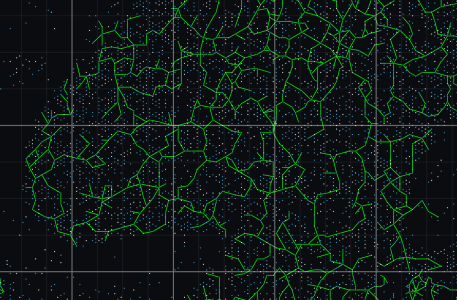
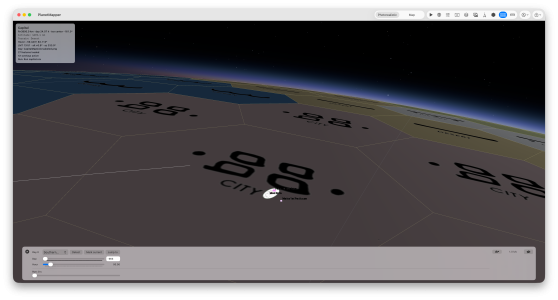
While the focus of this coming update is on the Mongoose bottom up bugs he found, I did manage to sneak in OTU route imports.

1776720144706.png

So this will be coming out once we confirm I have not broken more than I fixed with this version.

v0.10.x comes next. Here are my thoughts and I welcome anyone who may use the program to chime in with what they agree with, disagree with or would like to see.

The focus for the next series of updates will be Routes/Borders/Custom Filters and Colours etc

What I would like to have (as a user myself):

Routes:
1. Allow for different specific routs with customizable colours and labels. Sure I can make the default Route #1 Green and call it Xboat, but the colour and the label should be allowed to be changed by the user
2. Add as many routes as I want
3. Routes can be automatic (using the filter rules to set them) or manual or any combination thereof (i.e. I should be able to manually change a route that was generated automatically)
4. I should be able to change the colour of each or any route later if I want to
5. I should be able to hide/unhide each route individually
6. Bring all route generation and modification into one simple menu (it is scattered right now)
7. Routes that overlap should be displayed side by side. One should never cover the other. I may actually decide on a different offset for each route #. E.g. Route #1 is always down the middle. Route #2 always to one side etc.
8. OTU routes should be downloaded into Route #1/XBoat by default.
9. Special for me: I want to be able to build routes automatically by filtering on combining WTN numbers like GURPS.

Borders:
1. Allow for automatic highlighting sections and build a simple border
2. NOT going to worry about including or dealing with blank hexes right now - if you want to have an area automatically bordered you have to select the blank hexes to include them
3. Not going to allow drawing individual borders for now - just a simple highlight the section and the border will draw around your highlight
4. Borders will always be on one side of the hexside or the other, so two borders can be against one another
5. Be able to change border colours
6. Be able to delete borders
7. OTU borders will be automatically downloaded with OTU imports
8. Borders should be able to be hidden/unhidden - probably not individually. Just borders on or off (unlike routes which I want to have individual choice of)
9. Need to be saved in the JSON save (just like routes)

Advanced Filter Rules:
This works well but we should be able to hide/unhide them instead of just deleting them.

 
An update!

v0.9.3.2 is being tested. Special thank you to @Dodo98 who has been reviewing logs and such with me offline to keep me honest. He has saved me a ton of work and found more Mongoose creation issues.

While the focus of this coming update is on the Mongoose bottom up bugs he found, I did manage to sneak in OTU route imports.

View attachment 7962

So this will be coming out once we confirm I have not broken more than I fixed with this version.

v0.10.x comes next. Here are my thoughts and I welcome anyone who may use the program to chime in with what they agree with, disagree with or would like to see.

The focus for the next series of updates will be Routes/Borders/Custom Filters and Colours etc

What I would like to have (as a user myself):

Routes:
1. Allow for different specific routs with customizable colours and labels. Sure I can make the default Route #1 Green and call it Xboat, but the colour and the label should be allowed to be changed by the user
2. Add as many routes as I want
3. Routes can be automatic (using the filter rules to set them) or manual or any combination thereof (i.e. I should be able to manually change a route that was generated automatically)
4. I should be able to change the colour of each or any route later if I want to
5. I should be able to hide/unhide each route individually
6. Bring all route generation and modification into one simple menu (it is scattered right now)
7. Routes that overlap should be displayed side by side. One should never cover the other. I may actually decide on a different offset for each route #. E.g. Route #1 is always down the middle. Route #2 always to one side etc.
8. OTU routes should be downloaded into Route #1/XBoat by default.
9. Special for me: I want to be able to build routes automatically by filtering on combining WTN numbers like GURPS.

Borders:
1. Allow for automatic highlighting sections and build a simple border
2. NOT going to worry about including or dealing with blank hexes right now - if you want to have an area automatically bordered you have to select the blank hexes to include them
3. Not going to allow drawing individual borders for now - just a simple highlight the section and the border will draw around your highlight
4. Borders will always be on one side of the hexside or the other, so two borders can be against one another
5. Be able to change border colours
6. Be able to delete borders
7. OTU borders will be automatically downloaded with OTU imports
8. Borders should be able to be hidden/unhidden - probably not individually. Just borders on or off (unlike routes which I want to have individual choice of)
9. Need to be saved in the JSON save (just like routes)

Advanced Filter Rules:
This works well but we should be able to hide/unhide them instead of just deleting them.
Having BTN numbers/tables for automatic trade route building would be awesome!
 
I would really like if the generator would expand the UWP data for the planet's size and hydrosphere, to generate them further to have a specific diameter (in km, not just in units of 1,600 km) and a specific hydrosphere % (accurate to ones, not just tens of %). So, instead of just UWP Size 6 it would also have an entry showing e.g. Diameter: 10,223 km; and instead of UWP Hydro 7 it would also have an entry showing e.g. Hydrosphere: 72% (Water).

Would this be possible? If it already is, apologies, I couldn't find it (how do I get it to show?).

While I'm at it, how about a System Nature/Type heading showing if the system is a solo, binary, trinary, etc. system? Sure, you can see it once you collapse all the system data, but it would be nice to have it at the top, to see it at a glance. Not a biggie, just a convenience (for me at least).

EDIT: This all for the MongTrav 2e version, haven't tried the CT or T5 versions.
 
Last edited:
Having BTN numbers/tables for automatic trade route building would be awesome!
My Brother! I never played GURPS Traveller but I enjoyed Far Trader as a supplement to my game and I have always wanted an automated BTN route planner.

My thinking is, for now, to build the easy solution of combining WTNs and then using the distance chart. I know there are some adjustments for Trade Codes but I may skip that for the first version as they add a lot of complexity without changing the end result for most routes. Let me know your thoughts.
 
I would really like if the generator would expand the UWP data for the planet's size and hydrosphere, to generate them further to have a specific diameter (in km, not just in units of 1,600 km) and a specific hydrosphere % (accurate to ones, not just tens of %). So, instead of just UWP Size 6 it would also have an entry showing e.g. Diameter: 10,223 km; and instead of UWP Hydro 7 it would also have an entry showing e.g. Hydrosphere: 72% (Water).
Yes this should not be too difficult. Is this just for the aesthetics of a more realistic looking report?

I should be able to sneak this into one of the upcoming releases in this series.

While I'm at it, how about a System Nature/Type heading showing if the system is a solo, binary, trinary, etc. system? Sure, you can see it once you collapse all the system data, but it would be nice to have it at the top, to see it at a glance. Not a biggie, just a convenience (for me at least).

EDIT: This all for the MongTrav 2e version, haven't tried the CT or T5 versions.
This is a good idea. I too am tired of scrolling down or minimizing the windows.

I think, once the system is generated, the world details panel with the basic information should have a cell added so we can see the star configuration without going to the system. Agree?

I should also be able to sneak this into an update in this coming series.
 
hey Bartley, this is something of a noob question but what rules are the Mgt2e that the generator is using? I could have misread it, but I don't think they are the ones in the Core book
 
Yes this should not be too difficult. Is this just for the aesthetics of a more realistic looking report?
Not just for aesthetics, but for realism as well. Real planets don't appear in units of 1,600 km. As the WBH allows for detailed diameters (down to the km) with the formulas on p. 70-71, it would be great to have a "proper" diameter used in them and especially shown, not just UWP Size value. Maybe as an option if nothing else.

IMTU, I don't have characters talk about planets or in-universe data files show planets as e.g. 'a Size 7 planet', but instead as 'a 11,245 km diameter planet'. YMMV.
 
hey Bartley, this is something of a noob question but what rules are the Mgt2e that the generator is using? I could have misread it, but I don't think they are the ones in the Core book
Not a n00b question at all. Anytime the developer provides zero documentation every question is a good one.

You can do both. As @GabrielGABFonseca mentioned the ones that are getting a lot of attention right now are worlds built using the amazing World Builders Handbook (aka WBH)

But you can also create Mongoose Core rule worlds if you want to. You can:
(a) Select a hex (or hexes) with a system and right click and choose Generate Mainworld -> MgT2E, it will generate a mainworld based on the Core Rules.
(b) Select a hex (or hexes) with a system and right click and choose Generate Full System Top Down -> MgT2e; it will generate a mainworld using the Core Rules, and then generate the rest of the worlds and moons using the WBH. The WBH calls this second section the Continuation Method.

Any of the bottom-up options build all of the worlds using the WBH method and then picks one of them to be a mainworld.

I hope this helps, and thank you for trying the program.
 
Last edited:
Not just for aesthetics, but for realism as well. Real planets don't appear in units of 1,600 km. As the WBH allows for detailed diameters (down to the km) with the formulas on p. 70-71, it would be great to have a "proper" diameter used in them and especially shown, not just UWP Size value. Maybe as an option if nothing else.

IMTU, I don't have characters talk about planets or in-universe data files show planets as e.g. 'a Size 7 planet', but instead as 'a 11,245 km diameter planet'. YMMV.
OK Gotcha.

The change has been made in my development environment and I am in the process of testing it. Not only does it choose a random diameter down to the km, it also uses that diameter for the size driven formulas (gravity, escape velocity etc).

Barring finding a huge problem I would expect this to be available in a day or two. I have not changed the hydro % yet but I expect that will be done for the next release as well.

Thank you for explaining YTU. It helps to understand.

BTW @Terry Mixon and anyone else asking for OTU paths. I pushed out v0.9.3.2 yesterday. That corrected some Mongoose calculations on the orbital spread and hzco and also now grabs xboat routes when you Import Imperium or Universe. This DOUBLES the times for importing these files so be sure to save JSON once you have done it so you don't need to keep downloading. At the moment you cannot download just the routes, they come with the systems.

Expect to release v0.10.0 in the next couple of days and, on top of the diameter and hydro precision updates I expect it will have stellar details on the world display and a brand new route system with the features explained upthread. Once the dust settles on that I will look to add borders (OTU and custom).
 
OK Gotcha.

The change has been made in my development environment and I am in the process of testing it. Not only does it choose a random diameter down to the km, it also uses that diameter for the size driven formulas (gravity, escape velocity etc).

Barring finding a huge problem I would expect this to be available in a day or two. I have not changed the hydro % yet but I expect that will be done for the next release as well.

Thank you for explaining YTU. It helps to understand.

BTW @Terry Mixon and anyone else asking for OTU paths. I pushed out v0.9.3.2 yesterday. That corrected some Mongoose calculations on the orbital spread and hzco and also now grabs xboat routes when you Import Imperium or Universe. This DOUBLES the times for importing these files so be sure to save JSON once you have done it so you don't need to keep downloading. At the moment you cannot download just the routes, they come with the systems.

Expect to release v0.10.0 in the next couple of days and, on top of the diameter and hydro precision updates I expect it will have stellar details on the world display and a brand new route system with the features explained upthread. Once the dust settles on that I will look to add borders (OTU and custom).
If I have the metadata file for my sector file can we add importing that to the import sector functions? It's in travellermap format.
 
Back
Top