Another System Generator: As Above So Below

Fantastic to hear. And I agree. I wanted the filter for my own custom trade routes I plan to build.

Travel Zone filters are easy and I will look at them next. The only thing stopping me from making a filter for everything was thinking up the UI for a super long list. But I knew I would end up there.

Anything else helpful for anyone? # belts? Cx or Ex values?
I'd wager the belts would be helpful to some. Honestly, you're going to have people wanting to filter on all kinds of things.

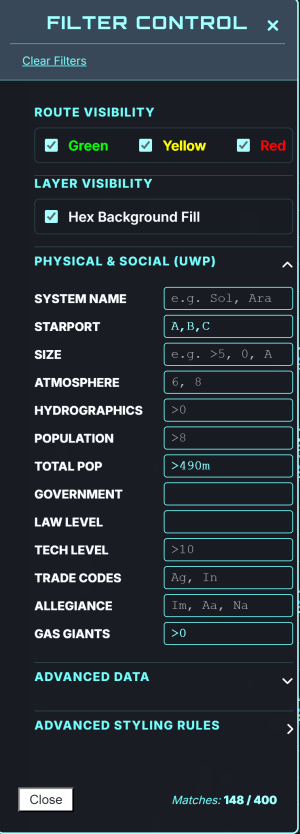
Right now, the filter controls look like this:

1775860115268.png

You could easily subdivide things when they get to crowded to make it easier to see by doing like Advanced Data and Advanced Styling Rules to have it expand.
 
Being able to open a system in a pop-up window or side bar and see the full extended system info would be nice. If it's an existing system on Travellermap, pulling up the data sheet from there would be helpful. But the extended system information is useful for planning development or plotting trade routes.
 
Being able to open a system in a pop-up window or side bar and see the full extended system info would be nice. If it's an existing system on Travellermap, pulling up the data sheet from there would be helpful. But the extended system information is useful for planning development or plotting trade routes.
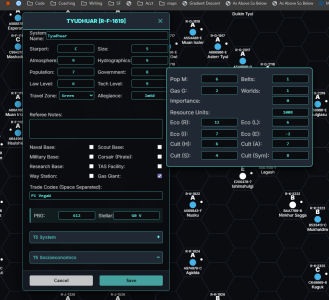
If you control+click a hex you get the basic details, with a button on the bottom of the window that let's you expand the system details.

Is that what you mean?

1775870742239.png


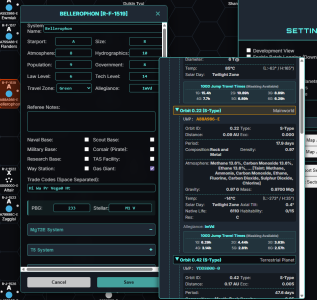
Of course the extended data in the TravellerMap is limited, but if you build out a mongoose generated system using the full generation down to the moons you can see that too.

One idea is to take the OTU sector from Travellermap and expand the full system using the Mongoose engine. It sort of works now. But is not tested.

1775870860056.png
 
If you control+click a hex you get the basic details, with a button on the bottom of the window that let's you expand the system details.

Is that what you mean?

View attachment 7906


Of course the extended data in the TravellerMap is limited, but if you build out a mongoose generated system using the full generation down to the moons you can see that too.

One idea is to take the OTU sector from Travellermap and expand the full system using the Mongoose engine. It sort of works now. But is not tested.

View attachment 7907
Yes, that's what I was looking for. Thank you.
 
I would. By filtering it, I would only see the valid ports of call. I don't have to interpret what zones they are. Blank means nothing valid there. A visible system means a valid port of call.

I only just realized this morning that my import was not importing Travel Zones at all! Everything was Green!

So version 0.7.2 was pushed into production this morning:

1. Fixed Travel Zone import bug
2. Added filters for Belts and Travel Zones (use R, A, or G)
3. Updated Filter UI to make room

As always new changes introduce the risks of new bugs, so please let me know if you see anything that is not working. And as always anyone who uses it is welcome to make a request to make it better for their game.

Normal caveats apply - free software, still in development, blah blah blah.

Updates I have on my list in no particular order:
- Added generation engines for Architect of Worlds and Cepheus Universal
- Export sectors into Obsidian (and other markdown readers)
- More customizations on look and feel
 
One of the things that Auto-Jimmy can do that would be a good fit for this is to be able to import all of Charted Space into the program and load it. As an option, that would be a timesaver.
 
One of the things that Auto-Jimmy can do that would be a good fit for this is to be able to import all of Charted Space into the program and load it. As an option, that would be a timesaver.
I will look into it. (BTW I am also an Auto-Jimmy user and it is amazing).

As a web program that tries to hold everything in memory, and make everything editable, I fear it will collapse under the weight of that many systems at once.

But there is no harm in exploring it and seeing what we can really do.
 
I will look into it. (BTW I am also an Auto-Jimmy user and it is amazing).

As a web program that tries to hold everything in memory, and make everything editable, I fear it will collapse under the weight of that many systems at once.

But there is no harm in exploring it and seeing what we can really do.
Perhaps seeing what the limit is and allowing for the click selection of sectors on a charted space map to load those? Manually loading and placing things is a pain for more than a few sectors.
 
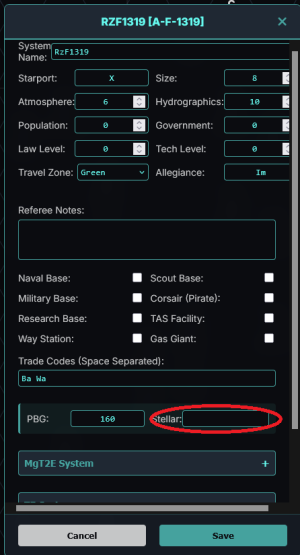
This is my data file. It imports correctly except the stellar classification.
Screenshot 2026-04-11 180555.png

Also, when generating extended system information can we get it added to the export/import? Being able to manipulate it in the program would be nice too but so long as I can do it in the jason that works.

Also, when generating expanded socioeconomic info, can we preserve the {Cx} data that is already there and use that? And also include it in the import/export information?
 

Attachments

This is my data file. It imports correctly except the stellar classification.
Ah that is not good. Was this a Travellermap file? If so, which Sector?

Also, when generating extended system information can we get it added to the export/import? Being able to manipulate it in the program would be nice too but so long as I can do it in the jason that works.
Well, the export is specifically for being able import into Travellermap. So it won't have the expanded system stuff.

The expanded system information is all in the JSON (or it should be). And that can be edited with a text editor.
I have been trying to wrap my head around a good way to edit the system data (being able to add moons or delete stars etc) but have not had the heart to tackle it yet. In the meantime the JSON file should be able to be edited and loaded back in.

What types of things are you editing and how would you like to see it handled?

Also, when generating expanded socioeconomic info, can we preserve the {Cx} data that is already there and use that?
Just so I understand, do you mean when you Import a TravellerMap sector that has Cx, then expand the Socioeconomic (T5 or Mongoose) the Cx is changing? That is not an expected result. It should keep the Cx. I will add this to my list of fixes.

And also include it in the import/export information?
Well Cx SHOULD be included in both the export and JSON files. So I will look into that as well.
 
I can certainly make it easier to load in sectors and multiple sectors. Will look into it and report back.
Yep. Laying out a route from Terra to Capital (or any other long distance) is a pain when done one at a time.

I haven't looked closely enough. Can I mark out my route and export it in a json? It does! And dragging the route again makes it go away. Excellent!
 
If I cannot get all of Chartered Space quickly, do you have a preference for a list of sectors I could start with. Imagine one button loads them all.
I wouldn't presume on that front. Right now, I am plotting between the Solomani Rim and Core but that could change at any point. Maybe you should have a list of all sectors with radio buttons to let the users choose on the fly? They'd still have to put them in order on the map, so that would be painful, but what can you do? Too bad the thing can't figure out orientation and sectors between two points and snag those that apply.
 
I wouldn't presume on that front. Right now, I am plotting between the Solomani Rim and Core but that could change at any point. Maybe you should have a list of all sectors with radio buttons to let the users choose on the fly? They'd still have to put them in order on the map, so that would be painful, but what can you do? Too bad the thing can't figure out orientation and sectors between two points and snag those that apply.
I'll experiment with some ideas and see what sticks.
 
Ah that is not good. Was this a Travellermap file? If so, which Sector?


Well, the export is specifically for being able import into Travellermap. So it won't have the expanded system stuff.

The expanded system information is all in the JSON (or it should be). And that can be edited with a text editor.
I have been trying to wrap my head around a good way to edit the system data (being able to add moons or delete stars etc) but have not had the heart to tackle it yet. In the meantime the JSON file should be able to be edited and loaded back in.

What types of things are you editing and how would you like to see it handled?


Just so I understand, do you mean when you Import a TravellerMap sector that has Cx, then expand the Socioeconomic (T5 or Mongoose) the Cx is changing? That is not an expected result. It should keep the Cx. I will add this to my list of fixes.


Well Cx SHOULD be included in both the export and JSON files. So I will look into that as well.
This is a corrected version of the Rzakki sector from TravellerMap. It's been submitted to official updating but still waiting to hear back on it going up.

I think I was just downloading the tab delimited text file, not the JSON, so I missed that.

When I ran the expanded Socioeconomic (Mongoose) it changed the Cx values, though it does warn you that it's going to do it. The expanded system info didn't give any warnings nor overwrite anything that I noticed so that is working. I didn't try the T5 versions.
 
This is a corrected version of the Rzakki sector from TravellerMap. It's been submitted to official updating but still waiting to hear back on it going up.

I think I was just downloading the tab delimited text file, not the JSON, so I missed that.

When I ran the expanded Socioeconomic (Mongoose) it changed the Cx values, though it does warn you that it's going to do it. The expanded system info didn't give any warnings nor overwrite anything that I noticed so that is working. I didn't try the T5 versions.
OK working backwards, I found the problem in not carrying over the Cx values (and the Ix and Ex values were not safe either), so that should be resolved shortly.

The stellar values SHOULD load from a .tsv but the format was designed to be taken from Travellermap, so if your .tsv is slightly different it could be missing. It might be resolved once it has been uploaded to Travellermap.


There is no documentation yet so things are a little confusing. Bottom line:

Import Sector (.tsv) -> this is for getting sectors from Travellermap (or any other source you make the effort to look like a Travellermap file)

Export Sector -> This is for using the Travellermap tools like booklet maker or poster maker. Use this file. I don't think it loads routes yet. Just mainwolrd/star/uwp data. It will not keep a record of anything Travellermap does not keep (no mongoose WTN or nonmainworld UWPs) because Travellermap does not use those.

Save JSON -> This is your save file. It saves everything (routes, moons, WTN whatever you have) into a text file format that is known as JSON. As long as you don't mess with the format you should be able to change the data inside if you want to try. But make a copy first.

Load JSON-> This is how you load your file so you can continue working or share it with someone else. This will have the full details.

Note: You can also import and export filter rules. So if you have your favorite style for one sector and want to apply it to another file, you don't have to start over.

 
OK working backwards, I found the problem in not carrying over the Cx values (and the Ix and Ex values were not safe either), so that should be resolved shortly.

The stellar values SHOULD load from a .tsv but the format was designed to be taken from Travellermap, so if your .tsv is slightly different it could be missing. It might be resolved once it has been uploaded to Travellermap.


There is no documentation yet so things are a little confusing. Bottom line:

Import Sector (.tsv) -> this is for getting sectors from Travellermap (or any other source you make the effort to look like a Travellermap file)

Export Sector -> This is for using the Travellermap tools like booklet maker or poster maker. Use this file. I don't think it loads routes yet. Just mainwolrd/star/uwp data. It will not keep a record of anything Travellermap does not keep (no mongoose WTN or nonmainworld UWPs) because Travellermap does not use those.

Save JSON -> This is your save file. It saves everything (routes, moons, WTN whatever you have) into a text file format that is known as JSON. As long as you don't mess with the format you should be able to change the data inside if you want to try. But make a copy first.

Load JSON-> This is how you load your file so you can continue working or share it with someone else. This will have the full details.

Note: You can also import and export filter rules. So if you have your favorite style for one sector and want to apply it to another file, you don't have to start over.
I figured the stellar issue out.
My tsv file was a conversion of the submission txt file, because submissions need to be in exact text with no tabs or commas, just each field exactly the same length. I have just discovered that the download .tsv is in a different order and with slightly different headers. Reordering my file and fixing the column headers fixed the issue.
Sorry for the bother.
 
v0.7.3 dropped this afternoon.
1. **Mongoose Socioeconomic:** Fixed bug that did not check if Ix, Cx, or Ex could be inherited
2. **Mongoose System Expand:** Fixed bug that did not make use of T5 Stellar information and PBG
3. **Import Sector .tsv:** Fixed bug that did not capture Worlds value
4. **Generate Xboat:** Added user options on range and jump distances
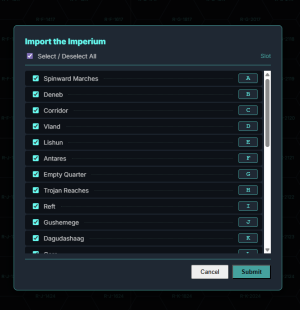
5. **Import Imperium:** Added the option to bulk import Imperial Sectors

To import the Imperium open the Settings button on the right and find the button down in the bottom. Then you can decide which sectors you want to import and which location you want them.

The default is all good to go to bring them all in, so just press Submit if you would like to try it out.

I am guessing the limits of what you can create or do without your browser choking is based on your memory. So everyone may have a different experience.

1776013442085.png

Reminder this is a free program that is still in development and it will change and/or produce unexpected results.

If you are doing any serious work I recommend you SAVE JSON often! I have lost a bunch of work by accidentally refreshing my browser.

Try it yourself here:
 
Back
Top