Terry Mixon
Emperor Mongoose
With Singularity coming out with Prototype Hop 1 ships, you might want to bump the max length on a route leg to 10.

Will put this in the next update. No harm in pushing the max length well beyond and let referees imagine Ancient Jump 20 technology.With Singularity coming out with Prototype Hop 1 ships, you might want to bump the max length on a route leg to 10.
Your website is fantastic and a great idea.Thank you to @GabrielGABFonseca for looking deeper into the Mongoose WBH results. The full Mongoose WBH system is the most intimidating part of the project and it is fraught with risks of little mistakes making significant inaccuracies.
This morning I pushed out v0.9.0.2. It patched the mongoose engine with four updates:
1. Only guaranteed rolls for life on worlds in the habitable zone and, if it is a top down approach, the mainworld
2. A 2D6 roll is done for every system and if 12 is rolled one inhospitable planet is randomly chosen for life checks.
3. Added life stats in the audit results (see below for more details)
4. Fixed a bug that removed Asteroid Belts from contention for mainworld selection.
For @GabrielGABFonseca and anyone else taking the time to look into the Mongoose results:
1) First, thank you. That section needs as many eyes on it as I can get. Feel free to report any concerns here.
2) I don't know why I changed the title of the field from Biomass Score in the book to Native Life in the UI. But do know that is the Biomass Score and I expect I will change it back to the book label unless I recall why I made the change in the first place.
3) Mainworlds at the moment are chosen (when doing a bottom up build) by Biomass score first, and the Resource score if the Biomass is tied (usually the result of no life in the system). I may make this configurable for the user - let me know if you have a preference.
4) You can enable detailed logs of each build by enabling 'Batch Logging' in the settings (click the gear). It is very long and detailed but if you want to know how a system came to be the details should be there.
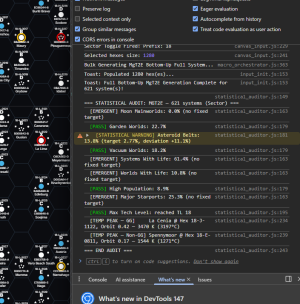
5) Here is a cheat: Press F12 to see the console. I place audit results of my systems into the console so I can keep an eye on things. I have added % of systems with life and % of worlds with life with this patch. You will see in the below photo I built a sector using Bottom Up and got 61% of the systems had life, and 11% of the worlds have life. This "feels" OK but I need to think on it. In this example I get a stat warning that there are more than expected Asteroid Belt mainworlds. I think that is OK because the thresholds are based on top down numbers, bottom up will be a little different and I would expect more asteroids now that I have reduced the amount of planets with life.
Thank you all again for the kind words and suggestions.
Here is an example of the console after a sector build:
View attachment 7943
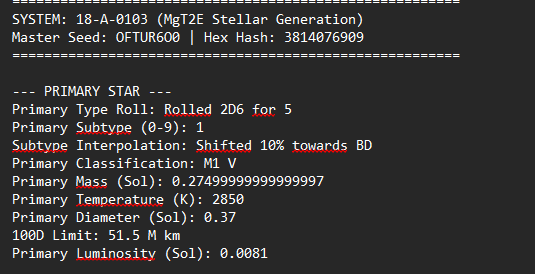
 But you might want to look at the star generation procedure again because some results I generated are not lining up with the WBH rules. Take the example star from the attached screenshot. It's a M1 V Red Dwarf, so it's mass, with max 20% variance, should be somewhere between 0.35 and 0.52 (interpolated mass is 0.43). Your generator created a 0.27 Mass M1 V, which is a bit off. The generated temperature is also not really close to where it should be. The interpolated temperature for an M1 V is 3560K. With some variance values between 3490K and 3630K should be feasible. But the generated star only has 2850K, far too cold for a star of that spectral class. And the diameter is also off. The interpolated value is 0.6, with variance between 0.48 and 0.72. The generator made it 0.37 Sol diameters. And because the previous values were all too low, the luminosity is also significantly too low. For a star of this spectral class, a value of around 0.03 to 0.08 would be normal (depending on its diameter and temperature).
Amazing feedback, thank you. I will look into this.Your website is fantastic and a great idea.
1) We do import allegiances so you could make your own filter rule for backgrounds. Drawing actual borders is tricky. Easy on a map that does not change, but building a system to automatically draw lines on hexsides is not high on the priority since we do have background hex options. But I will never say never.Likely a thing for the future but importing and displaying existing borders and xboat routes would be nice.
1) Bummer, but I get it.1) We do import allegiances so you could make your own filter rule for backgrounds. Drawing actual borders is tricky. Easy on a map that does not change, but building a system to automatically draw lines on hexsides is not high on the priority since we do have background hex options. But I will never say never.
2) I don't think I can export routes from Travellermap. Can I? I will go look again. If I can via the API then I will certainly add them.
I am not saying I will never do it, but it is not a priority right now. I am trying to focus on functions that help both OTU and custom builds.Re the borders. While you are correct that drawing them for custom sectors isn't needed or desired, a checkbox when importing the Imperium or the Universe would let those using the published areas to have those borders. The shading on the individual hexes is a bit intrusive, in my opinion. Other opinions may vary.

2) I don't think I can export routes from Travellermap. Can I? I will go look again. If I can via the API then I will certainly add them.
Thank you Gabriel. I should point out @CthulhuStig also responded to my DM so I am educated. These should not be too difficult to add so will be sure to add these to my v0.10 series of updates next week.The Travellermap sectors have an accompanying metadata file; I'm not sure how you're pulling the data for AASB, but they're accessible via the URL
https://travellermap.com/data/CODE/metadata where "CODE" is the sector's four-letter code. So as an example, the Spinward Marches' Metadata:
https://travellermap.com/data/spin/metadata
Information on how to make sense of it can be found on this page: https://travellermap.com/doc/metadata
It might be similar to the borders file I have for Foreven. Sounds similar as it has xboat data, too.Thank you Gabriel. I should point out @CthulhuStig also responded to my DM so I am educated. These should not be too difficult to add so will be sure to add these to my v0.10 series of updates next week.