Another System Generator: As Above So Below

Sector names is on the list but further in the future, I am afraid, as I don't store them at the moment on my native sectors.

What I have done since posting this morning's update:

1) Changed how the map is rendered so you don't need 64GB to load the full universe. It should move much more smoothly when zoomed out. Even 4GB computers should be able to load the full universe (thought it might still be a little laggy for them).

2) Made it possible to expand the system details with WBH stats for more than the current recommended 10 sector. 16GB RAM might be able to expand the entire Imperium down to each moon using WBH generation.

3) Add a toy I have wanted from the time I started making this - automated trade routing based on the filter. This is not exactly what you are looking for, Terry, but it is close. At the moment it links all planets within a range and plots the links based on a jump drive limit. In my case all WTN 10+ planets within 6 hexes of each other have been mapped using the quickest Jump-2 route.

Once I add the origin hex and target hex we should have an automated path from Terra to Core (or wherever to wherever) based entirely on planets in between that meet your criteria.

This should be ready for tomorrow barring unforeseen circumstance.
I just updated my Foreven file to have the sector and subsector names in them. It'll be ready when the time comes.
 
Hi All,

Another update this morning (v0.8)

This new version:
1) Makes it easier for slower and older systems to manage a larger amount of systems
2) Allows for the automatic plotting of routes constrained by any filter rules the user wishes to use (e.g. don't use X starports)

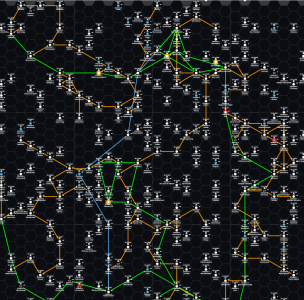
This is my homebrew sector:
1776179200917.png

The gold routes were automatically generated using range and jump values. In this case I filtered the worlds to WTN >9, then set the range to 6 and the Jump to 2. This then connected any 10+WTN worlds within 6 hexes of each other via Jump 2 routes. In this filter you are allowed to set a route to a non-filtered hex if it gets you to a filtered hex within the range.

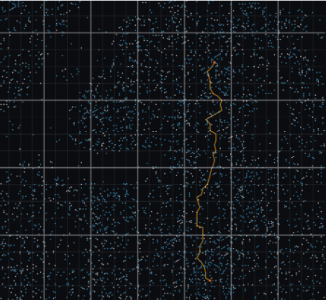
Then there is Terry's Terra to Capital run:
1776179710828.png

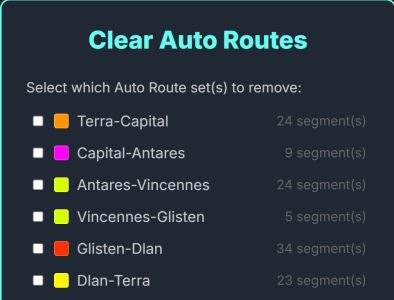
This uses a point-to-point filtered route set at a specific Jump. In this case a J-4 route. These ONLY stop at the filtered worlds, if they cannot get a route using only filtered worlds it will bounce back saying you can't get there from here.

You basically select two hexes, hit the Auto Routes button in the filter menu, and then make sure you check the point to point box.

@Terry Mixon I will say I could not get a J-4 route or even J-5 route from Terra to Regina using your >490m and >0GG filter. Not sure if that is a bug in my route system, an error in the map, or you really cannot connect those two without breaking a filter rule. I will let you play with it and please do report your findings.

There is more to do with routes. At the moment you can color the auto routes whatever you want but you cannot manually change them. That needs to be added. Also when two routes are on the same path they do not always render properly sometimes giving precedence to one over the other (ideally they are side by side). This is still being worked on.

As always this is free and still in development so feel free to use but understand things will change and not everything may be perfect yet.

Use it here: https://bartlebythecoder.github.io/traveller_magnus/hex_map.html
Full code here: https://github.com/bartlebythecoder/traveller_magnus

 
Hi All,

Another update this morning (v0.8)

This new version:
1) Makes it easier for slower and older systems to manage a larger amount of systems
2) Allows for the automatic plotting of routes constrained by any filter rules the user wishes to use (e.g. don't use X starports)

This is my homebrew sector:
View attachment 7930

The gold routes were automatically generated using range and jump values. In this case I filtered the worlds to WTN >9, then set the range to 6 and the Jump to 2. This then connected any 10+WTN worlds within 6 hexes of each other via Jump 2 routes. In this filter you are allowed to set a route to a non-filtered hex if it gets you to a filtered hex within the range.

Then there is Terry's Terra to Capital run:
View attachment 7931

This uses a point-to-point filtered route set at a specific Jump. In this case a J-4 route. These ONLY stop at the filtered worlds, if they cannot get a route using only filtered worlds it will bounce back saying you can't get there from here.

You basically select two hexes, hit the Auto Routes button in the filter menu, and then make sure you check the point to point box.

@Terry Mixon I will say I could not get a J-4 route or even J-5 route from Terra to Regina using your >490m and >0GG filter. Not sure if that is a bug in my route system, an error in the map, or you really cannot connect those two without breaking a filter rule. I will let you play with it and please do report your findings.

There is more to do with routes. At the moment you can color the auto routes whatever you want but you cannot manually change them. That needs to be added. Also when two routes are on the same path they do not always render properly sometimes giving precedence to one over the other (ideally they are side by side). This is still being worked on.

As always this is free and still in development so feel free to use but understand things will change and not everything may be perfect yet.

Use it here: https://bartlebythecoder.github.io/traveller_magnus/hex_map.html
Full code here: https://github.com/bartlebythecoder/traveller_magnus
It’ll be late before I can test it. The liner is J6, so hopefully that works. If not, it might be impossible to get there at that population and I might need to lower it to >390.
 
Well, let's get to the bottom of this. I did this in production.
1) Loaded the entire universe
2) I selected Terra and Capital. (I used SHIFT-LEFT CLICK for each - make sure they have an orange highlight)
3) Clear all the Filters so you see all of the dots (but Terra and Capital are highlighted)
4) Set the filter to Total Pop >490 and the Gas Giants to >0
5) Click on Auto Routes
6) Change the Max Jump to 6
7) Select Point to Point
8) Make sure you see a bunch of selected dots in the background and hit Generate
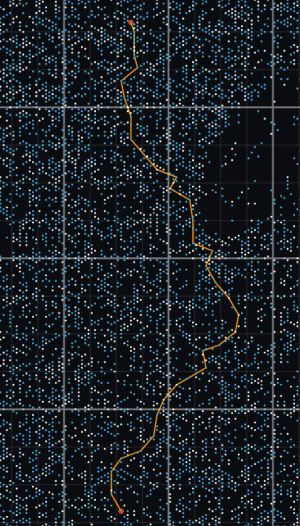
I get a 33 jump path.


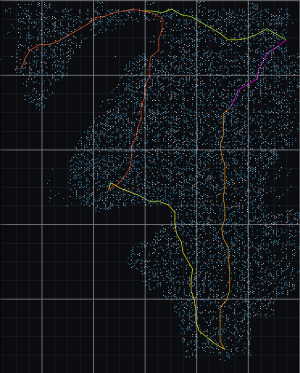
This is what it looks like with my filters on:
test_1.png


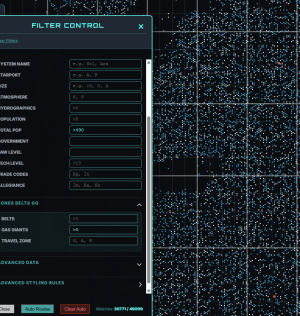
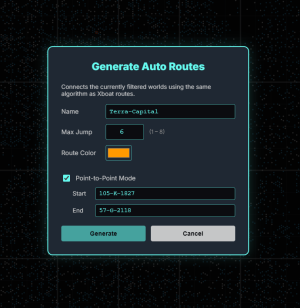
This is what my Route window looks like before I hit Generate.

1776199026991.png
 
Well, let's get to the bottom of this. I did this in production.
1) Loaded the entire universe
2) I selected Terra and Capital. (I used SHIFT-LEFT CLICK for each - make sure they have an orange highlight)
3) Clear all the Filters so you see all of the dots (but Terra and Capital are highlighted)
4) Set the filter to Total Pop >490 and the Gas Giants to >0
5) Click on Auto Routes
6) Change the Max Jump to 6
7) Select Point to Point
8) Make sure you see a bunch of selected dots in the background and hit Generate
I get a 33 jump path.


This is what it looks like with my filters on:
View attachment 7935


This is what my Route window looks like before I hit Generate.

View attachment 7934
I see what I did. I thought you said you managed it with D class starports and I didn't have E as an option. My bad on that one.
 
I see what I did. I thought you said you managed it with D class starports and I didn't have E as an option. My bad on that one.
Ah excellent I am glad it works. Yes, it does need to go down to E. But with this design (you inspired) you can easily try trade-offs by excluding E and dropping the pop threshold or any other combination you like pretty easily.
 
Back
Top